Huion Kamvas 13 GEN3 Drawing Tablet

Unboxing & Setup

There are two versions of the Kamvas 13 Gen 3, one with the stand and one without. The stand can be adjusted at 6 angles from 20 to 50 degrees. I reviewed the version with the stand, and I highly recommend buying it. It is also available in green and pink, as well as the original black one in this video review. It also comes with the ‘three-button’ pen, glove, and the pen holder has 10 spare nips inside its body. It is supplied with HDMI & USB cables for different scenarios. For instance, if your computer does not have enough power from its USB, you can connect a second one to a USB power supply. We did not need to do that, as our mini PC had enough power from its USB. 

To be able to set up the dials, buttons, and pen, you will need to download the driver software here

Drawing Software

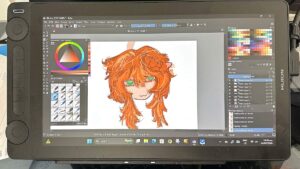
My daughter (10) already knew how to use Krita, and she already had it on this mini PC. She also has it on her Android cellphone. Krita is free open source software, and you can download it here

In the two months she has had the tablet, she has created many, many drawings like the one in the photo

I recorded the video above before giving it as a Christmas gift to my daughter

Conclusion

This tablet is not a standalone model, and thus it costs substantially less. You can use it with a laptop, desktop, or mini PC, running Windows, macOS, or Linux. All the buttons and dials on the unit and pen are customizable. You can also use it to browse, check your emails, or use any app on your computer  

HUION Kamvas 13 (Gen 3) Drawing Tablet with Screen,13.3" Full-Laminated Art...
HUION KAMVAS 16 (Gen 3) Drawing Tablet with Screen, 15.8 inch 2.5K QHD Art...
HUION Kamvas 22 (Gen 3) 21.5 Inch 2.5K 90Hz Drawing Tablet with Screen...
15.6" Drawing Tablet with Screen XPPen Artist 15.6 Pro Tilt Support...
XPPen Artist 12 3rd 11.9" Drawing Tablet with Screen | X4 Pen 16K Pressure...
XPPen Artist24 Pro 23.8 Inch Drawing Tablet with Screen 2.5K QHD Drawing...
HUION Kamvas 13 (Gen 3) Drawing Tablet with Screen,13.3″ Full-Laminated Art…
HUION KAMVAS 16 (Gen 3) Drawing Tablet with Screen, 15.8 inch 2.5K QHD Art…
HUION Kamvas 22 (Gen 3) 21.5 Inch 2.5K 90Hz Drawing Tablet with Screen…
15.6″ Drawing Tablet with Screen XPPen Artist 15.6 Pro Tilt Support…
XPPen Artist 12 3rd 11.9″ Drawing Tablet with Screen | X4 Pen 16K Pressure…
XPPen Artist24 Pro 23.8 Inch Drawing Tablet with Screen 2.5K QHD Drawing…
$209.00
$459.00
$599.00
$251.98
$199.99
Price not available
HUION Kamvas 13 (Gen 3) Drawing Tablet with Screen,13.3" Full-Laminated Art...
HUION Kamvas 13 (Gen 3) Drawing Tablet with Screen,13.3″ Full-Laminated Art…
$209.00
HUION KAMVAS 16 (Gen 3) Drawing Tablet with Screen, 15.8 inch 2.5K QHD Art...
HUION KAMVAS 16 (Gen 3) Drawing Tablet with Screen, 15.8 inch 2.5K QHD Art…
$459.00
HUION Kamvas 22 (Gen 3) 21.5 Inch 2.5K 90Hz Drawing Tablet with Screen...
HUION Kamvas 22 (Gen 3) 21.5 Inch 2.5K 90Hz Drawing Tablet with Screen…
$599.00
15.6" Drawing Tablet with Screen XPPen Artist 15.6 Pro Tilt Support...
15.6″ Drawing Tablet with Screen XPPen Artist 15.6 Pro Tilt Support…
$251.98
XPPen Artist 12 3rd 11.9" Drawing Tablet with Screen | X4 Pen 16K Pressure...
XPPen Artist 12 3rd 11.9″ Drawing Tablet with Screen | X4 Pen 16K Pressure…
$199.99
XPPen Artist24 Pro 23.8 Inch Drawing Tablet with Screen 2.5K QHD Drawing...
XPPen Artist24 Pro 23.8 Inch Drawing Tablet with Screen 2.5K QHD Drawing…
Price not available

Last update on 2026-04-23 / Affiliate links / Images from Amazon Product Advertising API

This product presentation was made with AAWP plugin.
Related articles

Logitech Z313 2.1 Multimedia Speaker System

EPSON EcoTank ET-3850 – Setup & Review

How to Upgrade an ASUS Vivobook with an M.2 SSD