How to Upgrade an ASUS Vivobook with an M.2 SSD

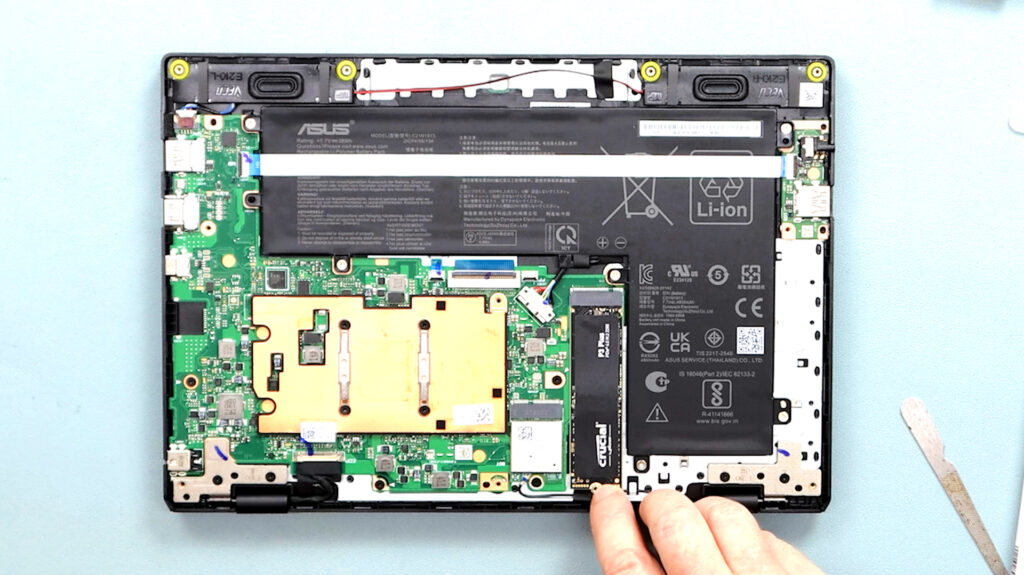
Below is a full Tutorial on how fit an NVMe M.2 SSD in your ASUS Vivobook 

What tools do you need:

  • Small Philips Screwdriver (PH0)
  • Plastic Prizing Blades or a Nailfile 
  • Patience 

Above is a video I made whilst fitting the SSD card. It is a full step-by-step tutorial  

I still use this Vivobook 12 Go

This laptop costs less than $200, and yet I still use it when traveling. In fact, I brought it on three trips to Europe, one traveling by road across 7 countries.

I love the fact that it is so small and light. The extra storage with the new SSD means I can store lots of video files. However, it is not powerful enough to edit my 4k videos, but I have two PCs for that at home.      

Best Budget Laptop?

Above is my review of ASUS Vivobook Go 12, soon after I purchased it in 2023

Related articles

Logitech Z313 2.1 Multimedia Speaker System

EPSON EcoTank ET-3850 – Setup & Review

Picture of Pascal

Meet Pascal

Hi! I’m Pascal, aka Irish Chippy

Check out my 3 YouTube Channels

Irish Chippy – Boopolo – Grow & Glow

My favorites

Explore more

Nordictrack T 6.5 S

Health & Fitness

Young Palm Trees

Home & Garden

ASUS Vivobook Upgrade

Electronics & Tech